
Prices
You set the price on the service, in Price including taxes. That is the price for one person and one slot. Leave the field empty for a service without a price.
How the total is calculated
| Reservation | Calculation | Total at a price of 10 |
|---|---|---|
| One person, one slot | price | 10 |
| 5 people | price × people | 50 |
| 3 slots (3 hours of a 60-minute service) | price × slots | 30 |
| 3 people for 2 slots | price × slots × people | 60 |
Whether customers can book for several people or several slots is decided by Max number of people allowed per reservation and Max number of slots per reservation on the service form.
Different prices at certain times
Use Prices at given times to charge more or less on certain days or at certain hours, such as evenings or weekends.
- Open setup, select Services and edit the service.
- Under Prices at given times, select Add price.
- Tick the days the price applies to.
- Enter the period in From and To, and the Price.
- Select Add price again for more periods, or Remove to delete one.
- Select Save service.
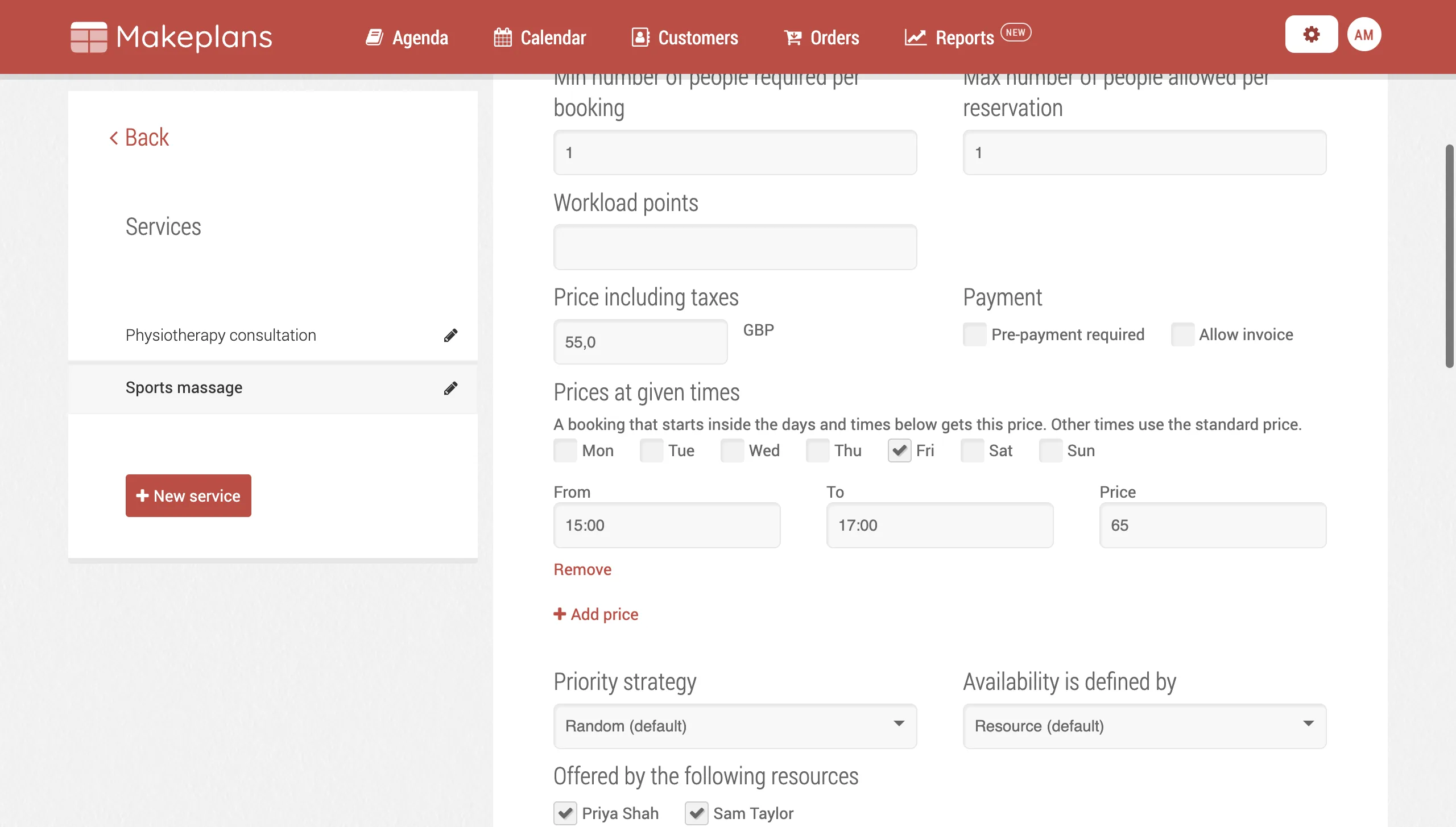
A reservation that starts inside one of the periods gets that price. All other times use the standard price.
Taking payment
Showing a price does not mean the customer pays online. To take payment when the customer books, connect a payment provider and tick Pre-payment required on the service. See Payments.
Prices for events
Events have their own price on each event. See Event types and events.