
Create a reservation
Customers make most reservations themselves on the booking site. You add one in the admin when a customer calls, emails or books at the counter.
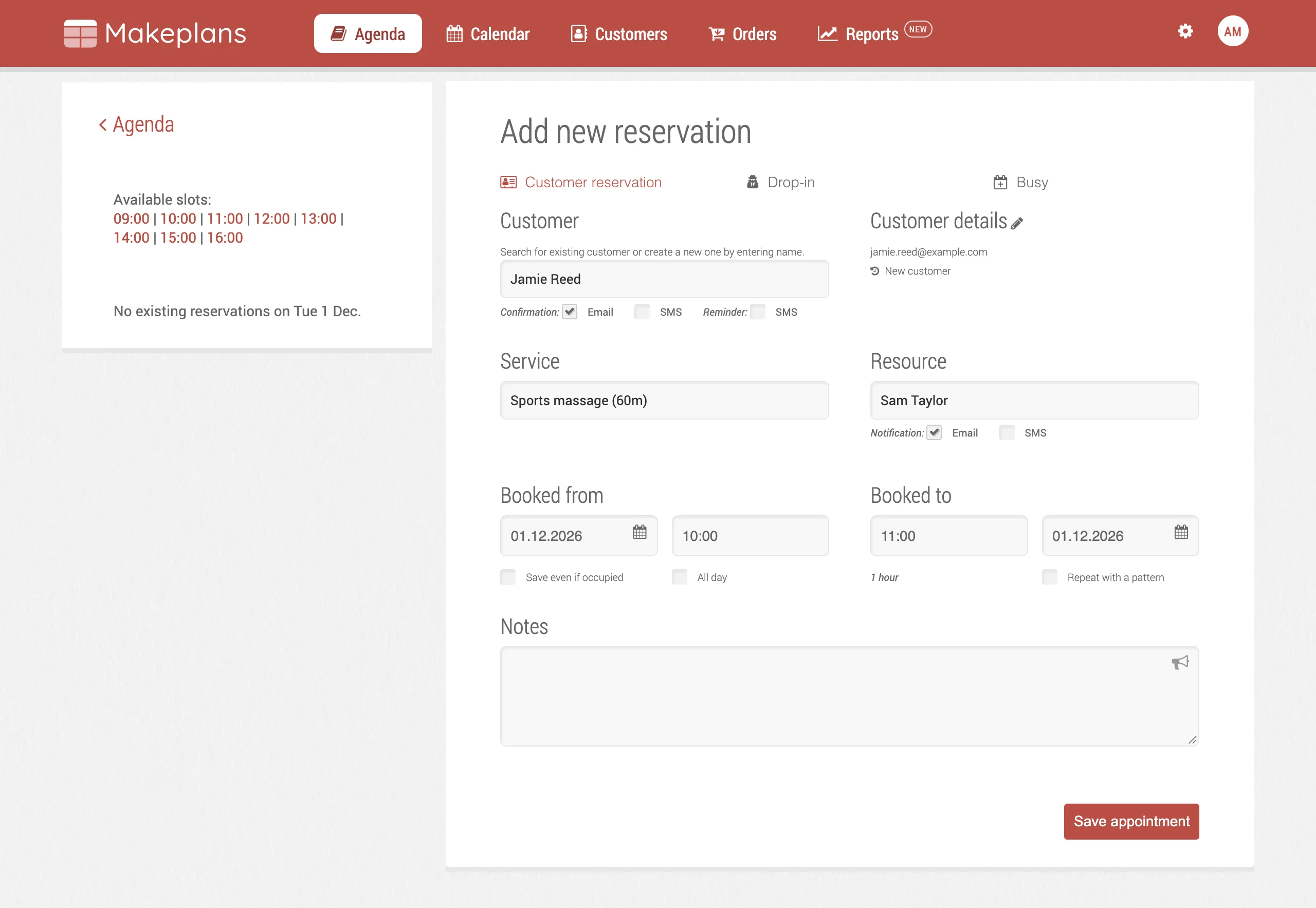
- Open the Calendar or the Agenda and select Add, then New reservation.
- Under Customer, search for an existing customer, or type a new name to create one.
- Select a Service.
- Select a Resource, or leave First available.
- Set the date and start time under Booked from. Booked to follows the duration of the service.
- Select Save appointment.
Find a free time
When you have chosen a service, the times that are free on the chosen date are listed under Available slots on the left. The same panel lists the reservations already made that day.
Messages to the customer and the resource
When you have chosen a customer, tick what to send:
- Confirmation: Email or SMS to the customer.
- Reminder: SMS to the customer before the reservation.
- Notification: Email or SMS to the resource.
Which boxes are ticked from the start follows your notification settings.
Other fields
| Field | What it does |
|---|---|
| Save even if occupied | Saves the reservation even if the resource is already booked at that time. |
| All day | The reservation covers whole days. |
| Repeat with a pattern | Creates a series, for example every week for ten weeks. Choose how often and when it ends. |
| Notes | Your own notes on the reservation. Select the megaphone to dictate. |
Types of reservation
At the top of the form you choose the type.
| Type | Use it for |
|---|---|
| Customer reservation | A normal reservation for a customer. |
| Drop-in | A customer who walks in when you do not want to, or cannot, record their details. The reservation is saved with the service and the time, but without a customer. |
| Busy | Time when the resource cannot be booked, such as a meeting or a vacation. Give it a Title instead of a customer. See Vacations, holidays and blocking dates. |
From a customer’s page
You can also open a customer from Customers and select New reservation. The customer is then already filled in.